
性能的考量:第二回(工具篇)
本文主要是介绍一些实用的性能相关的工具
1. 工具traceroute
我们都知道请求会通过不止一台路由器去跳转,直到找到最终的目标ip服务器。那么这个工具能够帮助你查看个中的细节。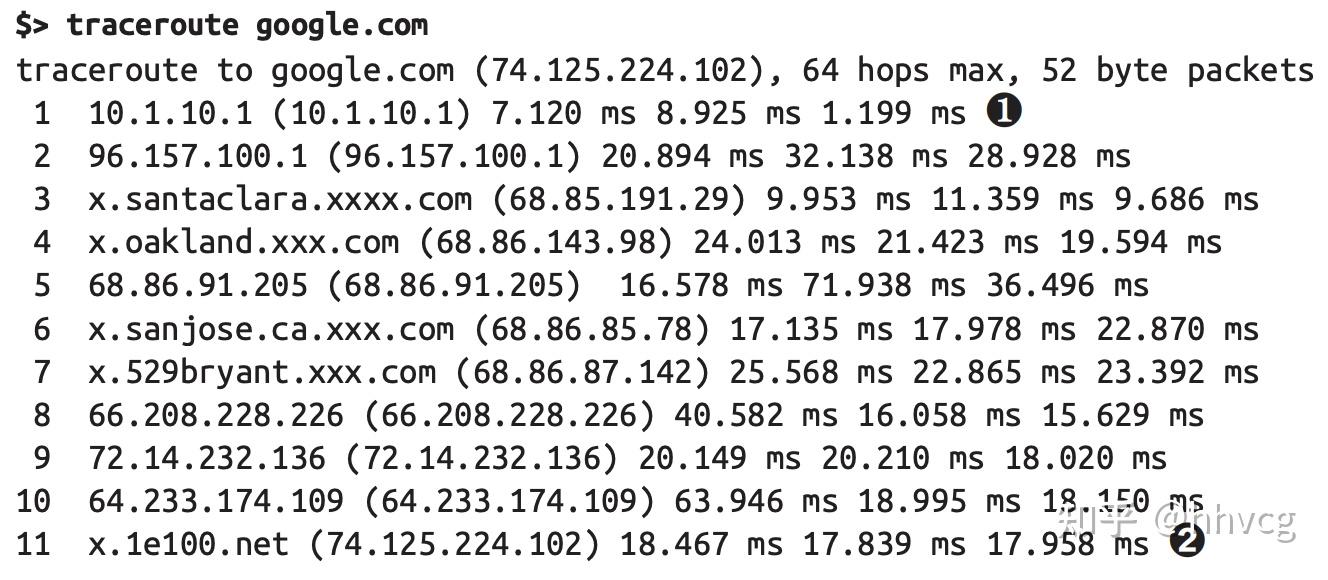
2. performance对象
运行一个前端项目,除了通过开发者工具中的memory组件,查看内存使用情况,实质上浏览器也提供了api。
通过window的performance属性,我们能够看到一些陌生的字段。包含memory、navigation、timing和eventCounts。
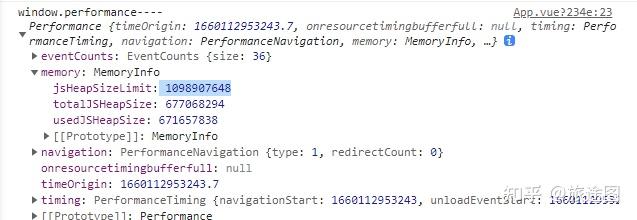
memory字段。很显然,就是我们想看的内存的大小。usedJSHeapSize表示:JS 对象占用的内存数。totalJSHeapSize表示:可使用的内存大小。jsHeapSizeLimit表示:内存大小限制。通常,usedJSHeapSize不能大于totalJSHeapSize,如果大于,有可能出现了内存泄漏。

利用这个api可以做一个页面性能的监控器
3. 工具curl,测试目标域的响应
curl www.baidu.com <!DOCTYPE html>
<!--STATUS OK--><html> <head><meta http-equiv=content-type content=text/html;charset=utf-8><meta http-equiv=X-UA-Compatible content=IE=Edge><meta content=always name=referrer><link rel=stylesheet type=text/css href=http://s1.bdstatic.com/r/www/cache/bdorz/baidu.min.css><title>百度一下,你就知道</title></head> <body link=#0000cc> <div id=wrapper> <div id=head> <div class=head_wrapper> <div class=s_form> <div class=s_form_wrapper> <div id=lg> <img hidefocus=true src=//www.baidu.com/img/bd_logo1.png width=270 height=129> </div> <form id=form name=f action=//www.baidu.com/s class=fm> <input type=hidden name=bdorz_come value=1> <input type=hidden name=ie value=utf-8> <input type=hidden name=f value=8> <input type=hidden name=rsv_bp value=1> <input type=hidden name=rsv_idx value=1> <input type=hidden name=tn value=baidu><span class="bg s_ipt_wr"><input id=kw name=wd class=s_ipt value maxlength=255 autocomplete=off autofocus></span><span class="bg s_btn_wr"><input type=submit id=su value=百度一下 class="bg s_btn"></span> </form> </div> </div> <div id=u1> <a href=http://news.baidu.com name=tj_trnews class=mnav>新闻</a> <a href=http://www.hao123.com name=tj_trhao123 class=mnav>hao123</a> <a href=http://map.baidu.com name=tj_trmap class=mnav>地图</a> <a href=http://v.baidu.com name=tj_trvideo class=mnav>视频</a> <a href=http://tieba.baidu.com name=tj_trtieba class=mnav>贴吧</a> <noscript> <a href=http://www.baidu.com/bdorz/login.gif?login&tpl=mn&u=http%3A%2F%2Fwww.baidu.com%2f%3fbdorz_come%3d1 name=tj_login class=lb>登录</a> </noscript> <script>document.write('<a href="http://www.baidu.com/bdorz/login.gif?login&tpl=mn&u='+ encodeURIComponent(window.location.href+ (window.location.search === "" ? "?" : "&")+ "bdorz_come=1")+ '" name="tj_login" class="lb">登录</a>');</script> <a href=//www.baidu.com/more/ name=tj_briicon class=bri style="display: block;">更多产品</a> </div> </div> </div> <div id=ftCon> <div id=ftConw> <p id=lh> <a href=http://home.baidu.com>关于百度</a> <a href=http://ir.baidu.com>About Baidu</a> </p> <p id=cp>©2017 Baidu <a href=http://www.baidu.com/duty/>使用百度前必读</a> <a href=http://jianyi.baidu.com/ class=cp-feedback>意见反馈</a> 京ICP证030173号 <img src=//www.baidu.com/img/gs.gif> </p> </div> </div> </div> </body> </html>curl www.baidu.com -i加上-i, 会打印出响应头信息
HTTP/1.1 200 OK
Accept-Ranges: bytes
Cache-Control: private, no-cache, no-store, proxy-revalidate, no-transform
Connection: keep-alive
Content-Length: 2381
Content-Type: text/html
Date: Tue, 05 Mar 2024 02:24:22 GMT
Etag: "588604c8-94d"
Last-Modified: Mon, 23 Jan 2017 13:27:36 GMT
Pragma: no-cache
Server: bfe/1.0.8.18
Set-Cookie: BDORZ=27315; max-age=86400; domain=.baidu.com; path=/
4. devtool的performance选项卡工具
查看从页面加载到最终的呈现,执行的每一个函数及其耗时。相当精细化的调试工具。
All articles in this blog are licensed under CC BY-NC-SA 4.0 unless stating additionally.